Posts Tagged ‘user pages’

SalesRank Comparison Charts for Multiple Books

Wednesday, June 8th, 2011

User Book Comparison Charts
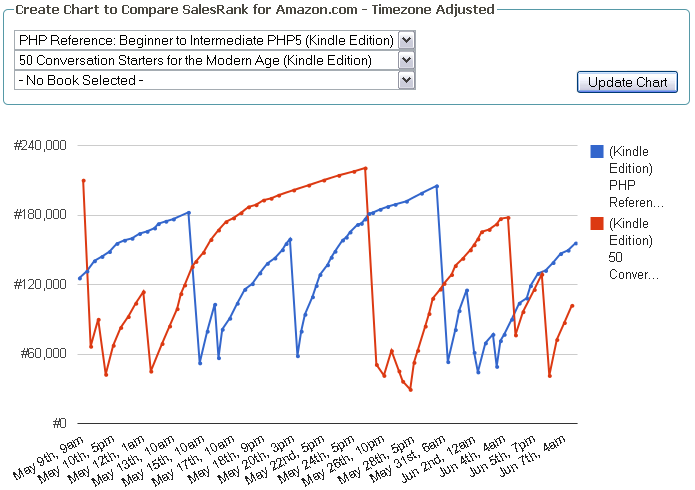
Yes, you read that right. If you’ve setup a user account and visit your user page, you will now find, at the bottom, a new form for selecting up to 3 books from your user page for comparison. The chart provided will display the salesrank over the past 30 days for all of the books you selected. This allows you to compare how certain titles are doing against each other in the last 30 days.

Oh, did you notice something else?
The chart is using Google’s charting API, which means that it is created completely in JavaScript by your web browser. That also means that it is visible even if you are using a device that does not support Adobe Flash, such as an Apple iPad. The downside to this new chart tool is that it does not allow for fullscreen mode and takes longer to display. On average, it will take 1 second to load the chart for each book selected (1 second for 1 book, 2 seconds for 2 books, etc).

Finally, the new chart is timezone aware, much like the RSS feeds on your user page. This allows you to get a more accurate picture of things if you are not located in the Pacific Timezone.

This is the first of two planned major improvements coming for NovelRank, and if you have any feedback on this new charting feature, positive or negative, leave it in the comments below.

Book Sales RSS Feed and CSV Download on User Pages

Wednesday, January 19th, 2011


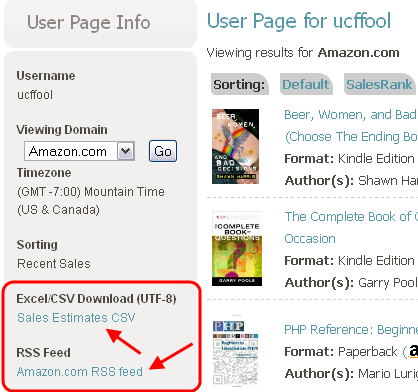
NovelRank User Pages now have two new features: RSS Feeds for book sales and CSV/Excel download of monthly sales estimates!
These are both long requested features, so they are now available on the left side. If you don’t have a user page yet, create your own user page by logging in through your favorite 3rd party website. You will be prompted to setup your user page if this is your first time logging in through that service.

Both new features will include every book present on your user page in a single download/RSS. In both cases, the download is for the currently viewed Amazon domain (.com, .co.uk, .de, etc). Switching the domain will switch the links for the download/RSS to the new domain automatically. The RSS feed has one additional new benefit: Timezone aware! That’s right: Sale times are now adjusted for your account’s timezone, and the timezone is specified within the RSS feed. My little thank you to all the folks in Germany and the UK who use NovelRank!

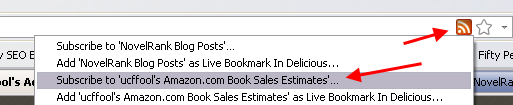
Remember, if you are using a modern browser, such as Firefox or Chrome, you can also access the RSS feed from the URL/Address bar. Of course, you can also subscribe to the blog this way… The below image is from Firefox.

Enjoy the new features, and I hope your 2011 is starting off with lots of sales!

NovelRank Feature Upgrades for the End of 2010

Thursday, December 30th, 2010

Christmas Candles 2010

To wrap up 2010, I’ve made some new improvements to NovelRank, so I thought I should give the community an update. I hope you are having a wonderful holiday break and that your sales, especially for e-books, have been huge after Christmas Day!


Here’s the list:

  • The facebook ‘like’ and twitter ‘tweet’ buttons have been updated for the book details pages, and when tracking a new book
  • When a book is reactivated from its inactive status, it will now take 3 times longer before it may become inactive again, to reduce the amount of false positives
  • Kindle book sales estimates are more accurate when sales rank drops below 6000
  • Sales estimates updated retroactively for those books affected by the above change **
  • When a book has more domains added for tracking, user pages that track that book will automatically be updated with the new domain info
  • More capacity available for tracking Amazon.de books in the future

If you received a new Kindle or Nook this holiday, consider picking up a copy of my newest e-book, 50 Conversation Starters for the Modern Age, for $2.99 and strike up a conversation with a stranger this season! You can even blog about it. :)

Happy New Year!

* Update 1:13pm PST (9:13pm GMT)

The initial round of ‘sales estimate’ updates were skewed very high. The formula has been fixed and reapplied.

* Update 3:18pm PST

Did a bit more tweaking based on feedback, trying to never overestimate. Done for real this time!

Sorting Book Results on User Pages

Thursday, September 2nd, 2010

user page book sortingHey look, another new feature based on user feedback! I’ll be honest, I never considered this because I track so few books, but for those publishers or crazy productive romance novel writers tracking TONS of books, there is now a way to quickly sort the books on your User Page.

The default was always the order in which they were added to your User Page through the Account Management section. Well, now there are some sorting options at the top of the page, including:

  • Default: Same as before, based on the order the books were added to your user page
  • SalesRank: Pretty straightforward, the lower the rank the higher up on the page
  • Recent Sales: The books with the most recent sales will be at the top
  • Month Sales: Based on the total number of sales in the current month

sorting - editingsorting - click to edit

Your default sorting preferences have been added as an option in Account Management!

Simply click on the Sorting section and choose which option you would prefer. Once chosen, click Change to save your changes.

When you return to your User Page, it will now display using your selected Sorting order!